How to Change a Character’s Pose with AI: References and Review
On this page
You have a character you like. Now you need that character sitting, waving, reaching for something, or throwing a punch. The new image gets the action right, but the arms look shorter, the boots have changed, or the body suddenly seems larger.
To change a character’s pose with AI, give the tool the original character image and describe only the new action. If the tool supports a separate pose or composition reference, use it to show the movement. Then compare the result with the original: matching hair and clothing does not, by itself, establish matching body proportions.
This guide focuses on illustrated characters for comics, stickers, mascots and game art. The same checks apply whether you need one new pose or a set of animation frames.
This guide now includes eight archived experiments, with original comparison images and animation previews from October 17–20, 2026. The full overview below compares a standing reference, a manually posed control, a Qwen run and a Gemini run, from left to right. The same character is deliberately reused to make differences easier to inspect.
What worked: a manually controlled three-frame pose and a narrowly tested export-scale correction. What partly worked: generating a recognizable crouching punch. What did not pass: automatically preserving all the reference’s proportions, ground position and sheet boundaries. These are historical research results, not a claim that every experimental method is available in the live generator.
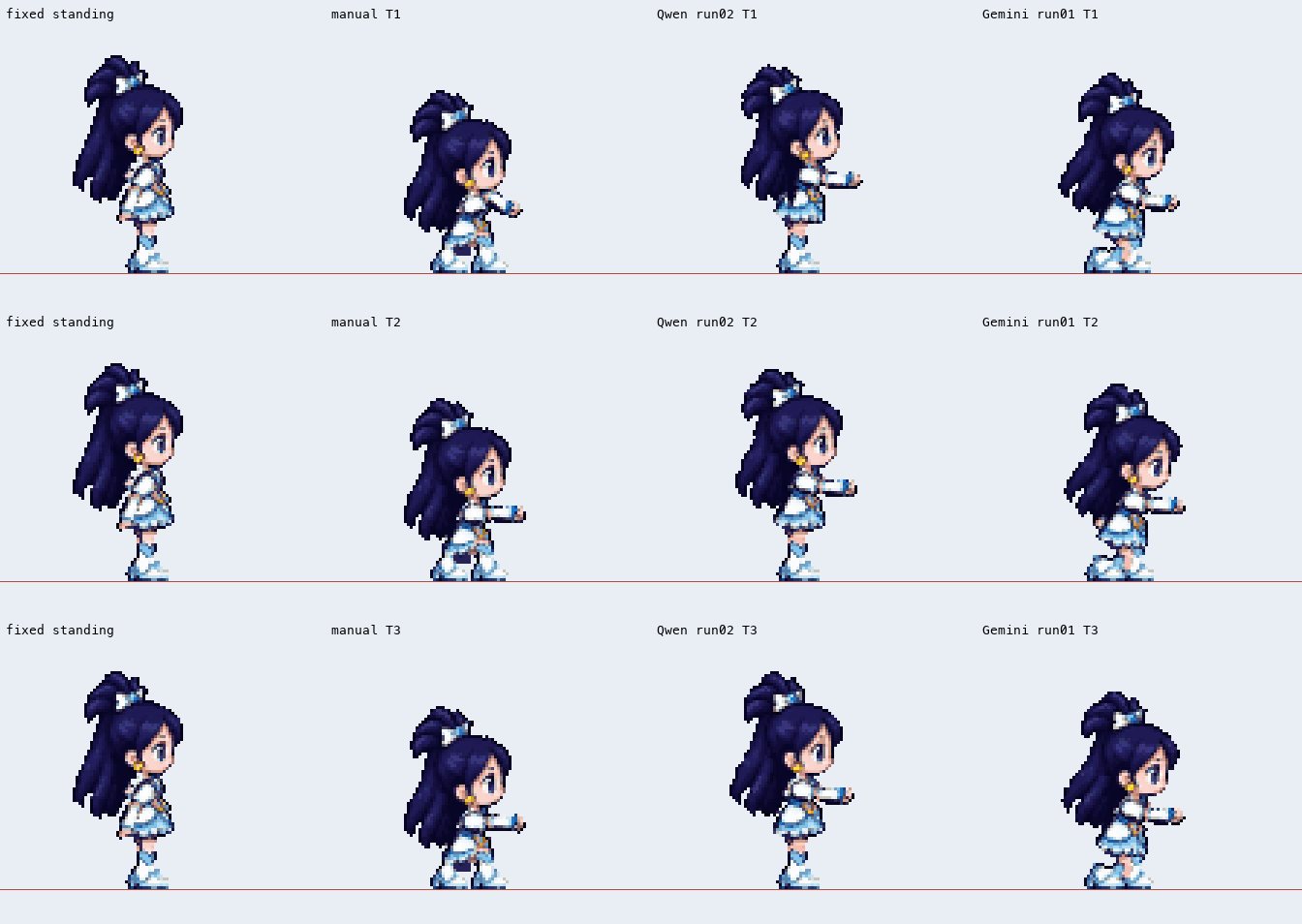
Open any comparison image or animation to inspect its original-sized file.
1. Start with the character you want to keep
Choose a clear reference that shows the whole character, including the hands and feet. A neutral standing pose is useful because bent or overlapping limbs make lengths harder to judge. Keep the original file as your reference throughout the process.
Write a short list of the design details that matter in this particular character: the head shape, hairstyle, outfit silhouette, glove cuffs, boot tops or a distinctive accessory. You will use these details to review the output, rather than relying on whether it looks familiar at first glance.
2. Ask for one pose change
Start with an edit request rather than a fresh text description of the character. Keep the camera angle and drawing style stable while testing the movement.
For example:
Use the uploaded character as the design reference. Show the same character crouching, facing right, with one arm extended forward and the other bent near the chest. Keep the hairstyle, face, outfit, colors and body proportions from the reference. Keep both feet visible. Change only the pose; keep the camera angle and drawing style.
Treat that as an instruction to evaluate, not a guarantee. A result can follow the requested pose while still changing the design.
For another use case, replace the movement: “sitting on a stool and waving” or “reaching up with the left hand.” Avoid asking for a new outfit, different perspective and new art style in the same first test. You will have fewer changes to untangle if something goes wrong.
3. Separate the character reference from the pose reference
The original image answers “who is this?” A pose sketch answers “what are they doing?” Label the two inputs so their roles are clear:
Image A defines the character’s appearance. Image B defines the target pose. Use the pose from B while retaining the character design from A.
A pose sketch can be simple: indicate the head, shoulders, hips, elbows, knees and feet. Check that its limb lengths suit your character. Copying an adult human pose directly onto a large-headed cartoon character can introduce a different set of proportions.
Support varies by tool. Google’s image-generation documentation recommends a pose reference for complex poses. Adobe Firefly provides a composition reference control based on structure, including outline and depth. These are examples of available guidance controls; neither is evidence of exact, fixed-length body constraints. See Google’s image-generation guide and Adobe’s composition-reference documentation.
4. Compare at the same scale
Put the original and the new pose next to each other. For a grounded pose viewed from the same angle, align the supporting feet to a common floor line. Keep the same display scale instead of stretching each image independently to fill an equal-height box.
A crouching character should occupy less vertical space because the joints bend. Making the crouching image as tall as the standing image enlarges the character. Shrinking the entire image until it looks short can cause the opposite problem: the head, hands and clothing shrink along with it.
| Check | What to compare |
|---|---|
| Head | Visible face and skull size; hair can swing or change silhouette |
| Torso | Shoulder width and visible garment landmarks, allowing for bending and rotation |
| Arms | Upper arm and forearm separately; judge bent segments rather than shoulder-to-hand distance |
| Legs and boots | Knee-to-ankle segment and boot-top position, allowing for perspective and overlap |
| Ground | Supporting feet share the intended floor; raised feet remain raised |
| Framing | Hands, feet and long props fit without squeezing the whole character smaller |
Do not infer precise bone lengths from a wrist, elbow or waist that is hidden by clothing. A visible garment edge is useful for checking the garment; it may not locate the joint underneath it. If a part is concealed or strongly foreshortened, mark that comparison as uncertain.
Eight real experiments: what worked and what failed
The examples below retain the archived character pixels and comparison layouts. Red lines are diagnostic reference lines; they do not correct the character’s position. Animation previews use the experiments’ diagnostic timing. A repeated three-frame preview is not evidence of a complete animation cycle.
| Experiment | Result | What it establishes |
|---|---|---|
| 1. Manually posed fixed parts | Success within the control | Existing parts can perform this three-frame crouching punch |
| 2. AI pose parameters | Failed the target pose | Valid render instructions can still produce an almost standing character |
| 3. A stronger vision-model configuration | Improved, still failed | A deeper bend is not enough to match the target |
| 4. Explicit grid coordinates | Position partly improved; proportions failed | A ground target does not lock the visible body design |
| 5. Six-frame generation through the local project | Action succeeded; scale unaccepted | Recognizable movement and character consistency are separate checks |
| 6. Measured reference bounds | Input definition improved; output failed | Measuring a silhouette does not force the model to obey it |
| 7. Cleaner input and a frozen action plan | Failed sheet boundaries | A source-image error can exist before export |
| 8. Source-viewport export scaling | Success within the export test | Export-added magnification can be removed without redrawing the character |
1. Success within a manual control: keep the parts, change the pose
This standing character and crouching preview use the same fixed artwork parts and renderer. The three crouching frames are driven by authored pose parameters, not by an AI successfully extracting the pose.

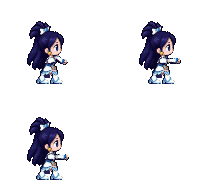
Result: the renderer can reproduce this specific crouching sequence without scaling the whole character down. That is a useful success for the controlled artwork pipeline. It does not demonstrate automatic character decomposition, automatic pose recognition, new camera angles or a finished animation loop. It is not a live SpriteGen feature demonstration.
2. Failure: valid AI parameters, almost no crouch
The Qwen experiment kept the same parts, renderer and scale, and replaced only the pose parameters with the model’s interpretation of reference images. In the animation below, the columns are standing reference → manual control → AI result.
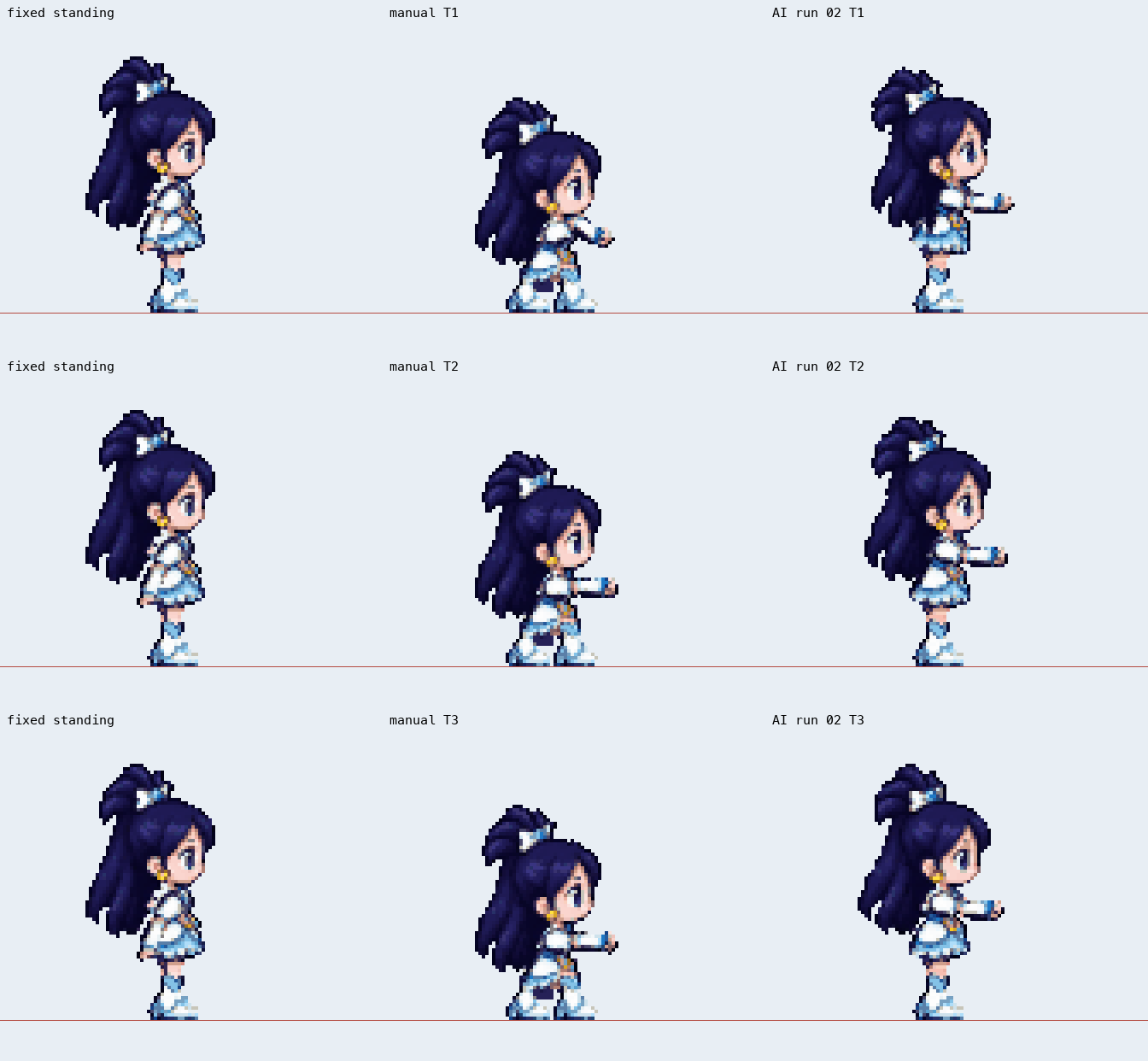
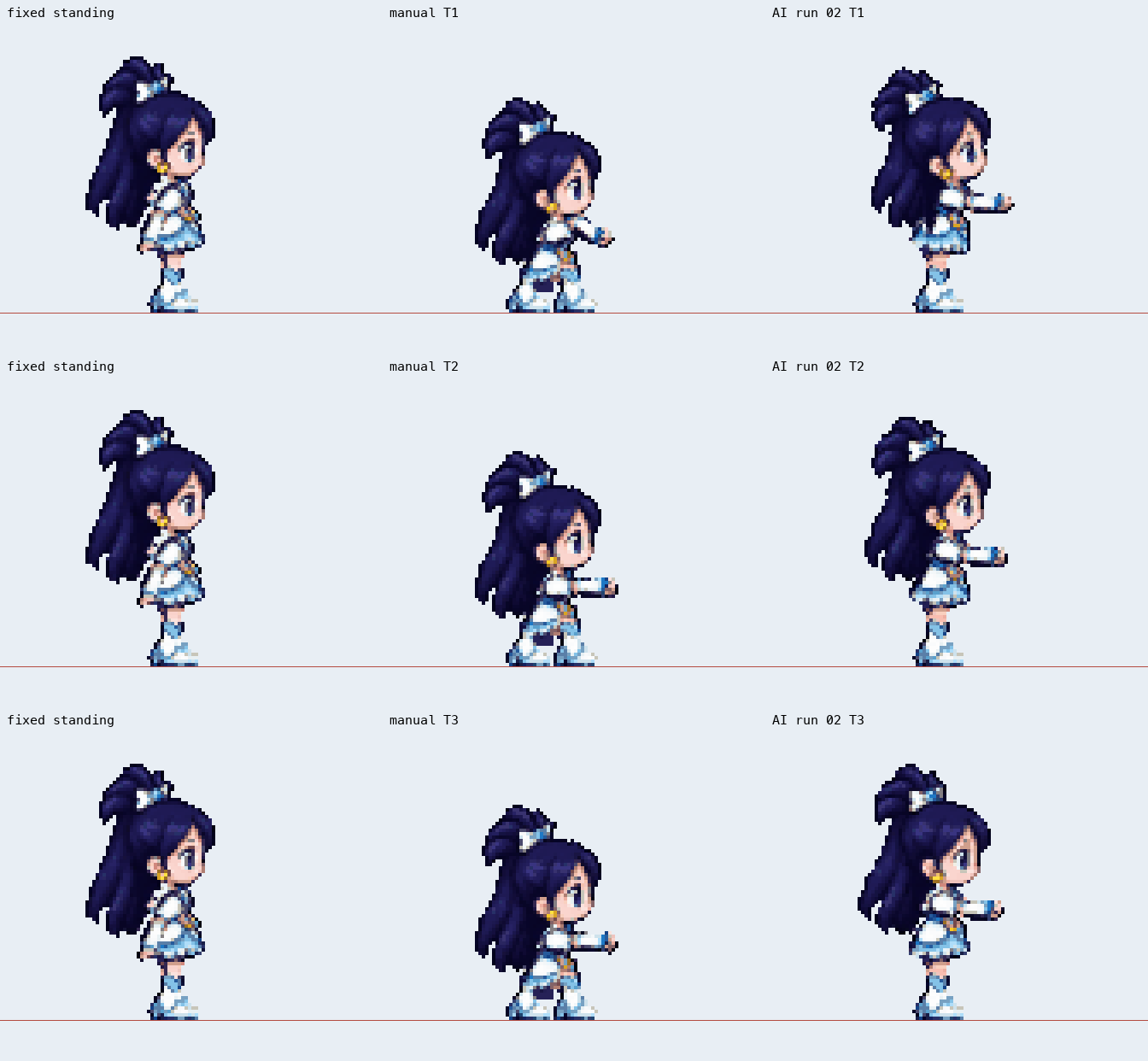
Result: the complete AI response could be rendered and passed the experiment’s format, reachability, ground-contact and canvas checks. Visually, its knees and hips stayed close to standing. A response that describes a low crouch is not enough; the resulting frames must actually crouch.
Inspect all three frames of the failed pose
3. Partial improvement: a deeper bend still misses the target
The next archived configuration used Gemini with the same frozen artwork and input images. It produced a lower pelvis and more knee bend than the complete Qwen baseline. The four columns are standing → manual target → Qwen → Gemini.
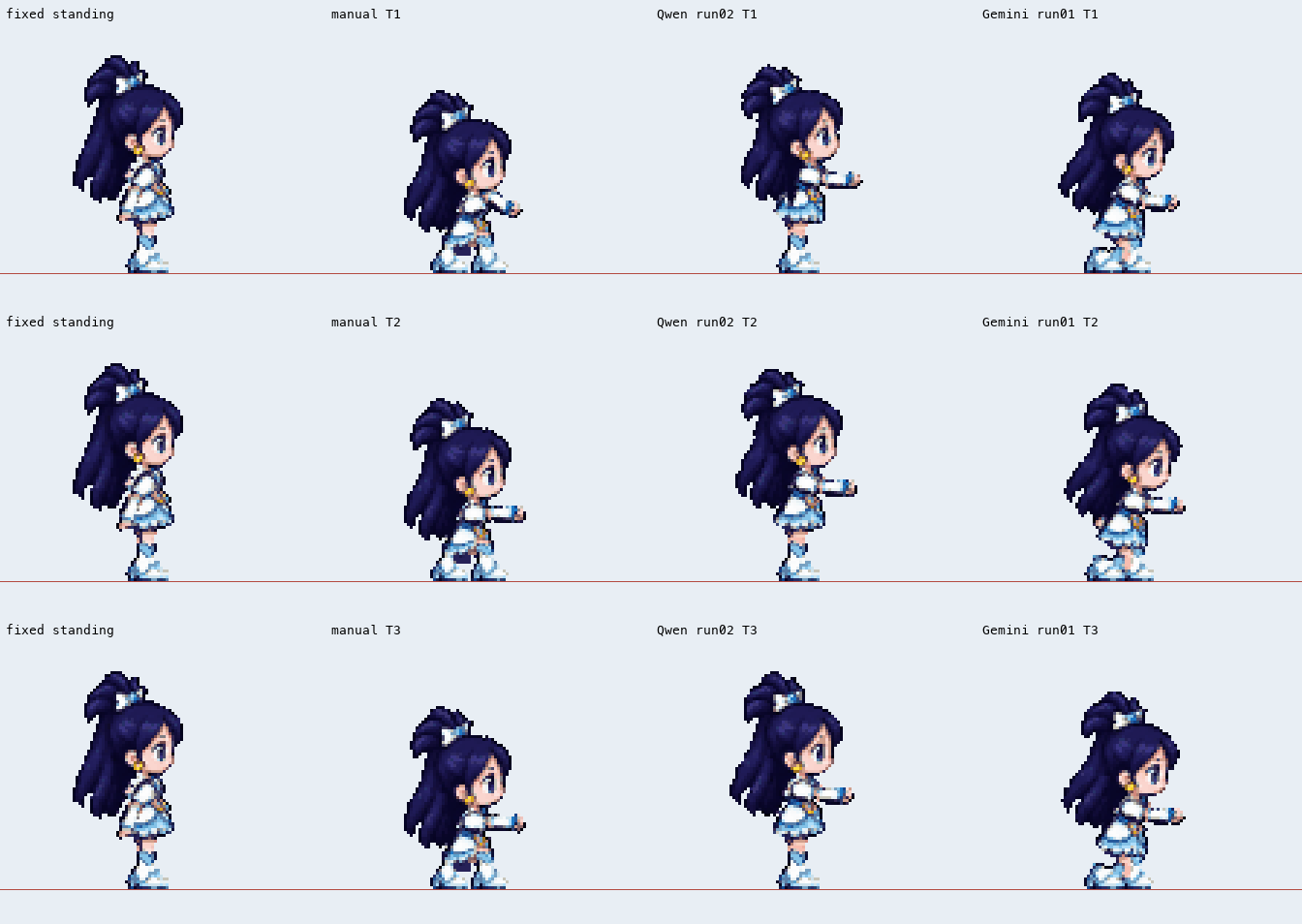
The second independent run is also shown, rather than selecting only the better-looking first result:
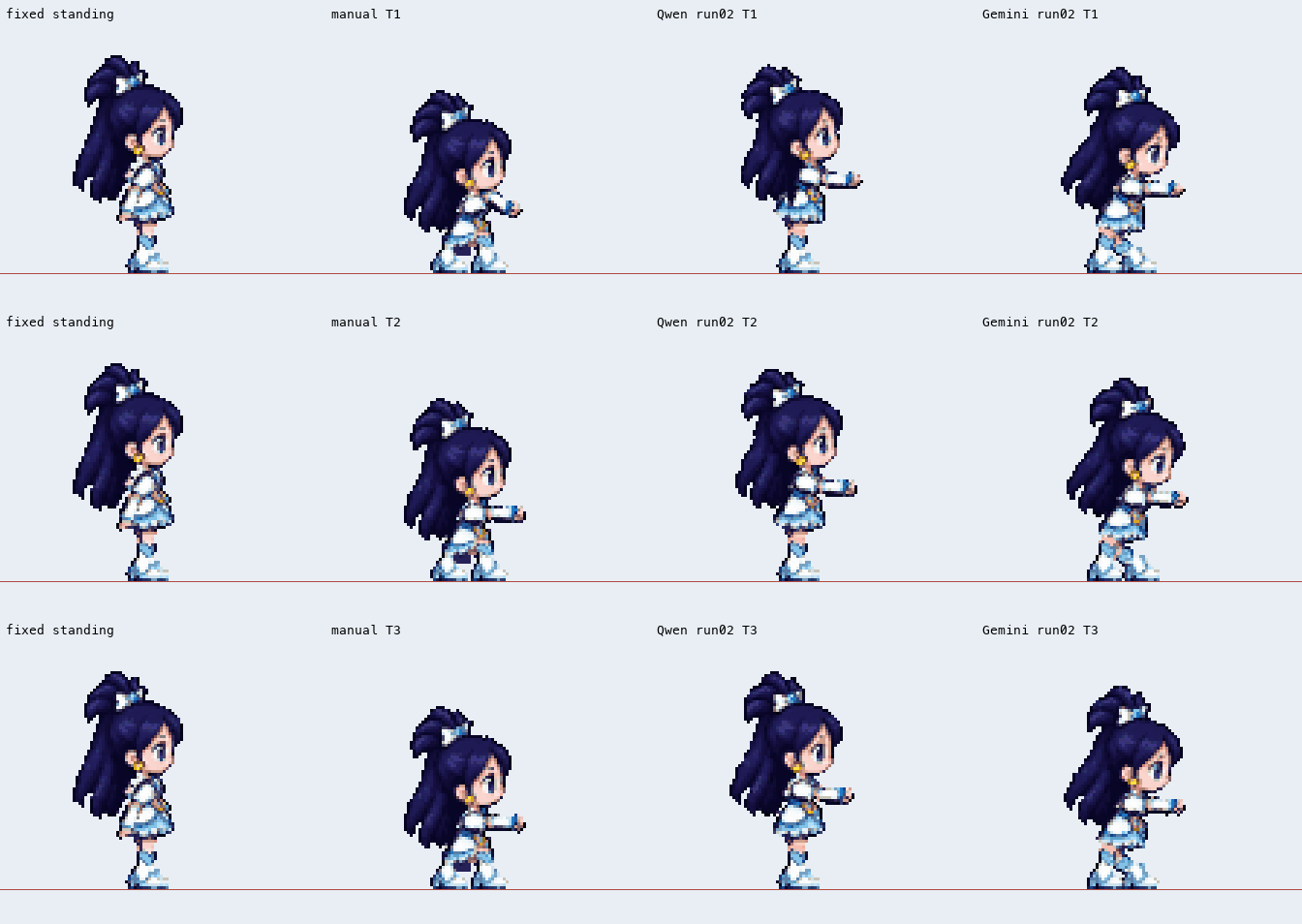
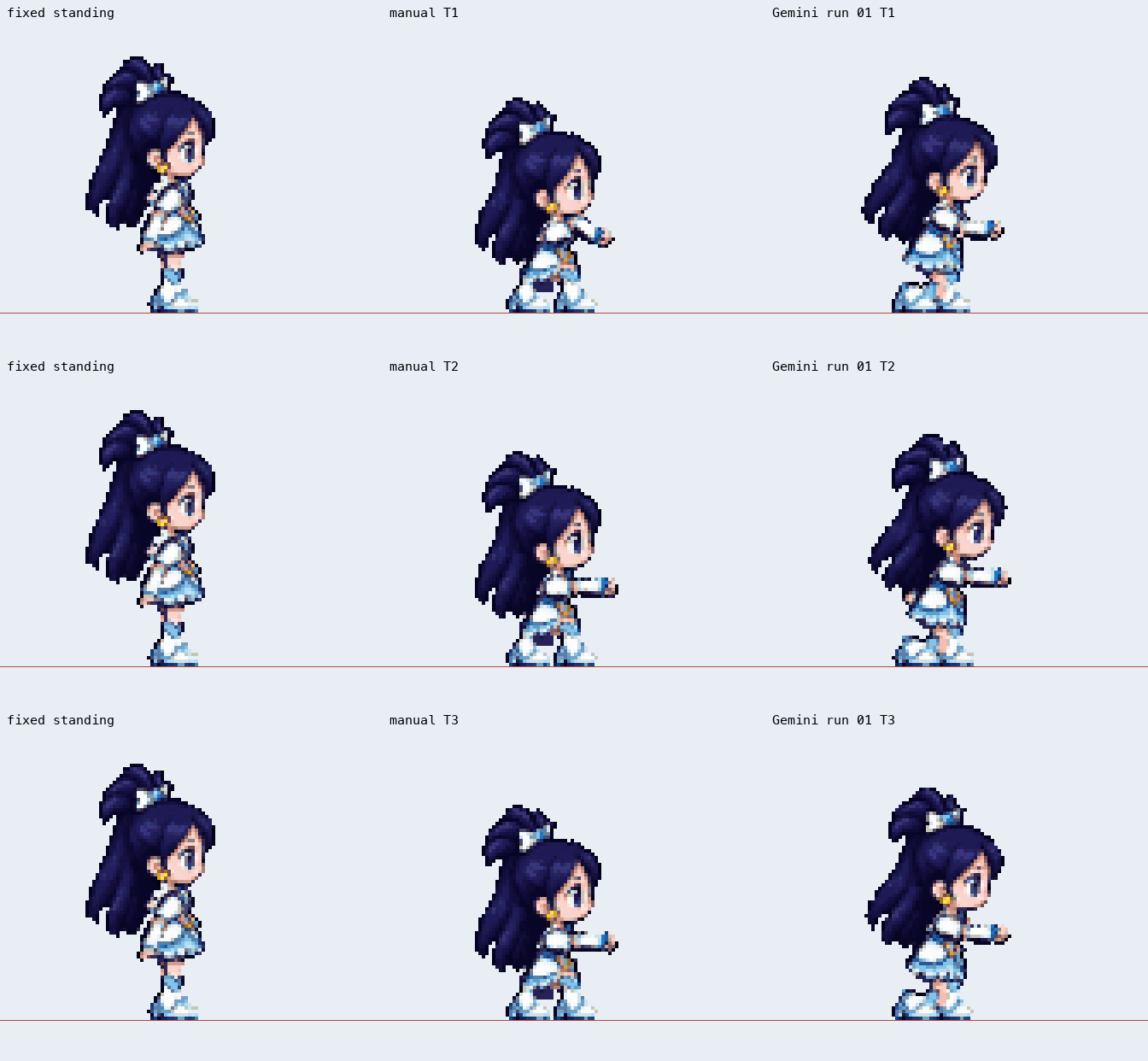
Result: improvement, not acceptance. Both runs still missed the experiment’s pose and visual checks. The Gemini configuration also required low reasoning, while the Qwen baseline had reasoning disabled, so this was a model-and-required-configuration comparison, not a perfectly isolated architecture test. These historical labels do not make a general claim about either model today.
Inspect the first improved run frame by frame
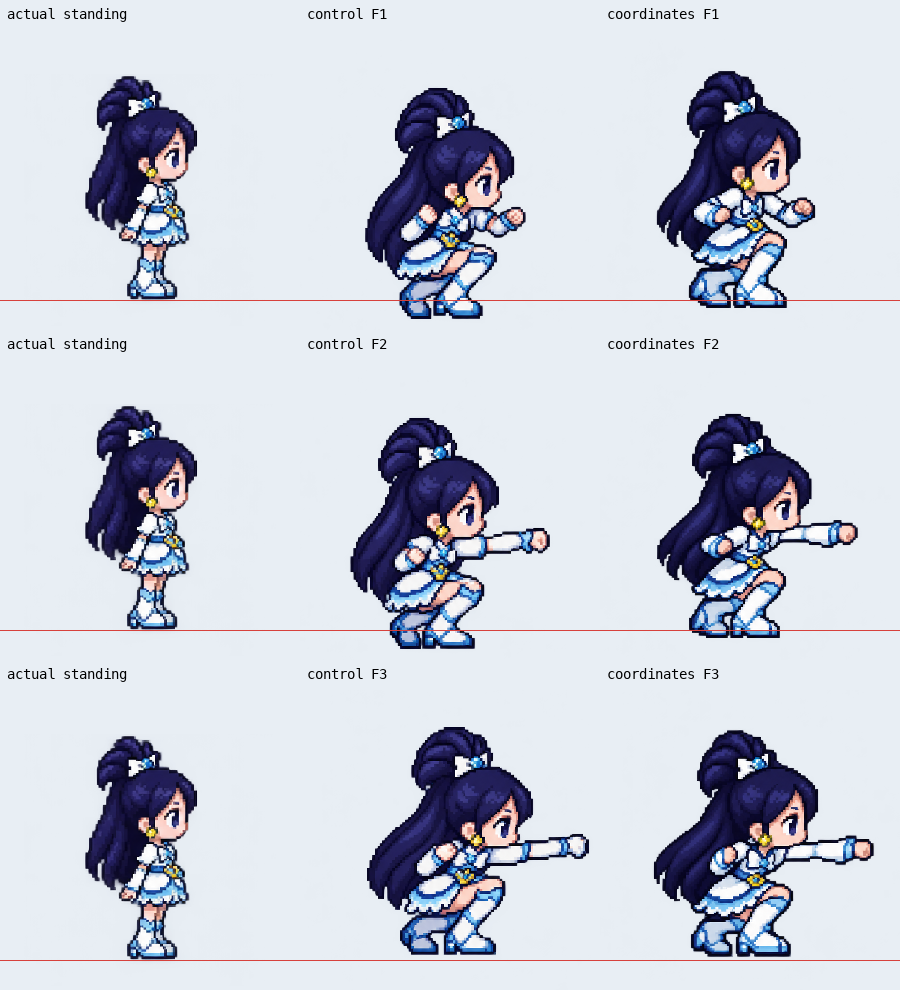
4. Failure: coordinates move the feet closer, but the body still drifts
This image-generation comparison used the same saved standing reference, requested action, image model and layout. The coordinate version added explicit per-cell coordinates and measured reference bounds. Columns are standing reference → control prompt → coordinate prompt.
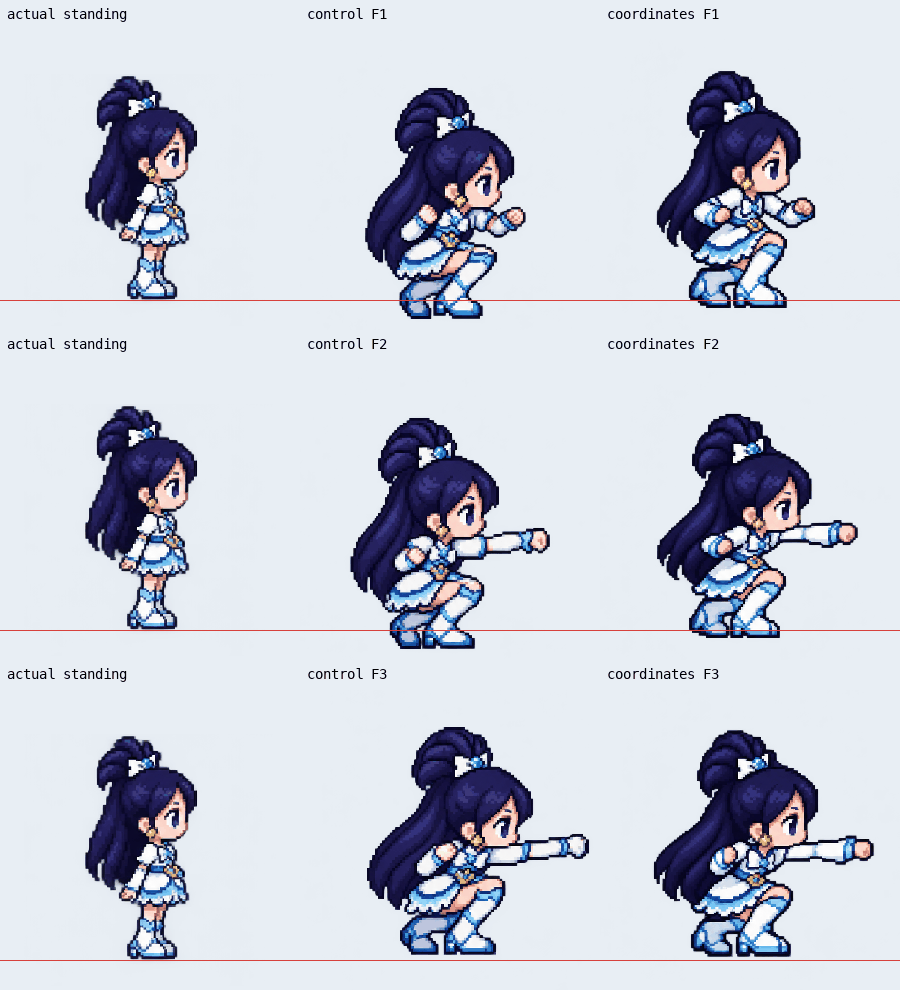
Result: both generated samples visibly crouched and punched. In this one pair, mean absolute foot-position error fell from 4.93 to 2.28 percentage points of cell height. But the heads and body appearance still enlarged relative to the reference, and the feet moved between frames. A closer floor position is a partial result, not proof of unchanged proportions. There was only one generated sheet per condition.
Inspect all three control and coordinate frames
5. Partial success: six recognizable crouching-punch frames
This run went through the local project’s actual generation endpoint. It produced a wind-up, punch and recovery while staying crouched. The columns show original standing input → newly generated calibration reference → generated crouching frames.
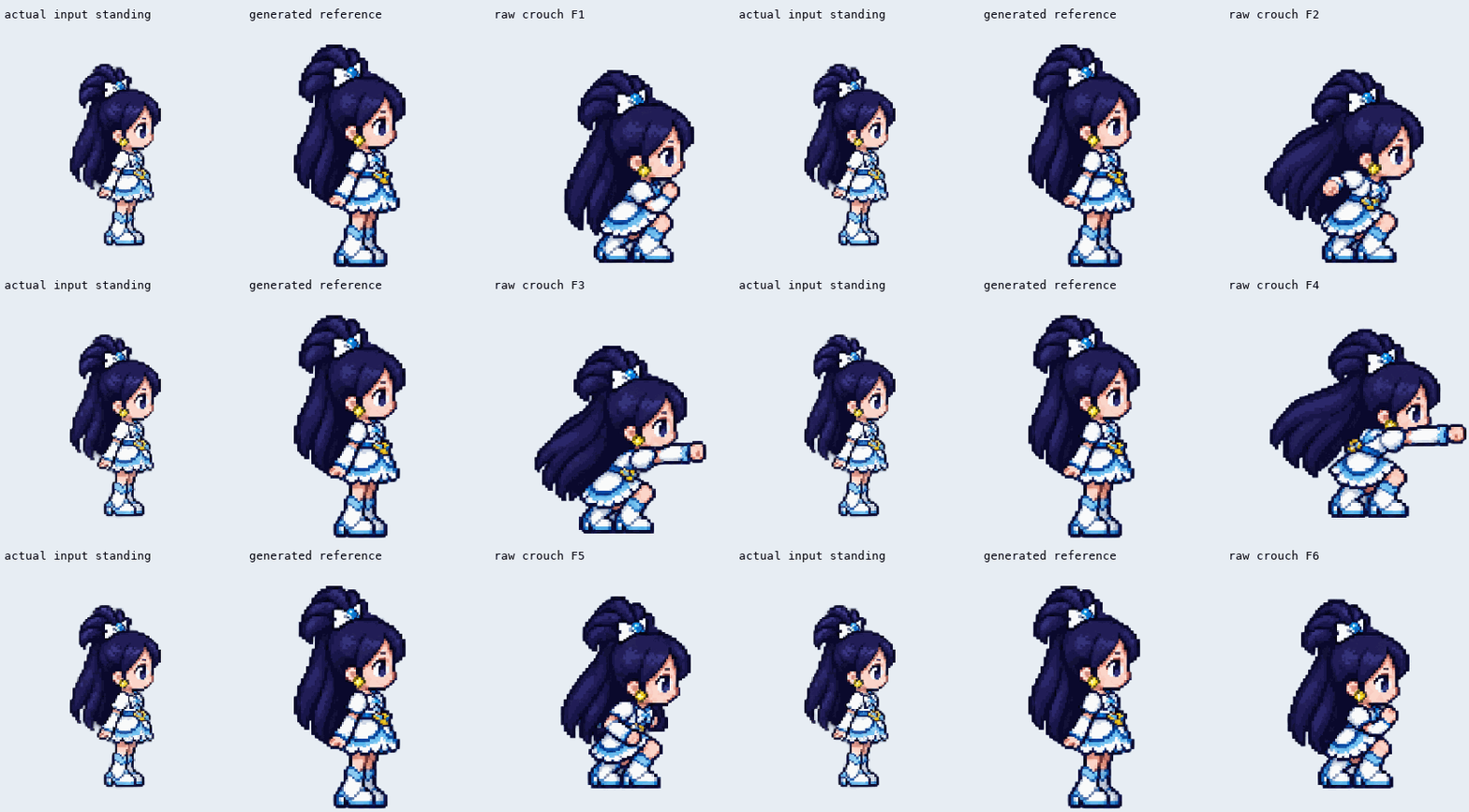
Result: the requested action was recognizable, which is useful. The generated standing reference also became larger, so the set did not establish preservation of the original design’s scale. Export verification used a local page calling the shared export function; it was not a complete production-workbench acceptance test. The experimental “64” export also used 72-pixel cells, so it did not pass a strict 64-pixel-cell requirement.
Inspect the entire six-frame action, including recovery
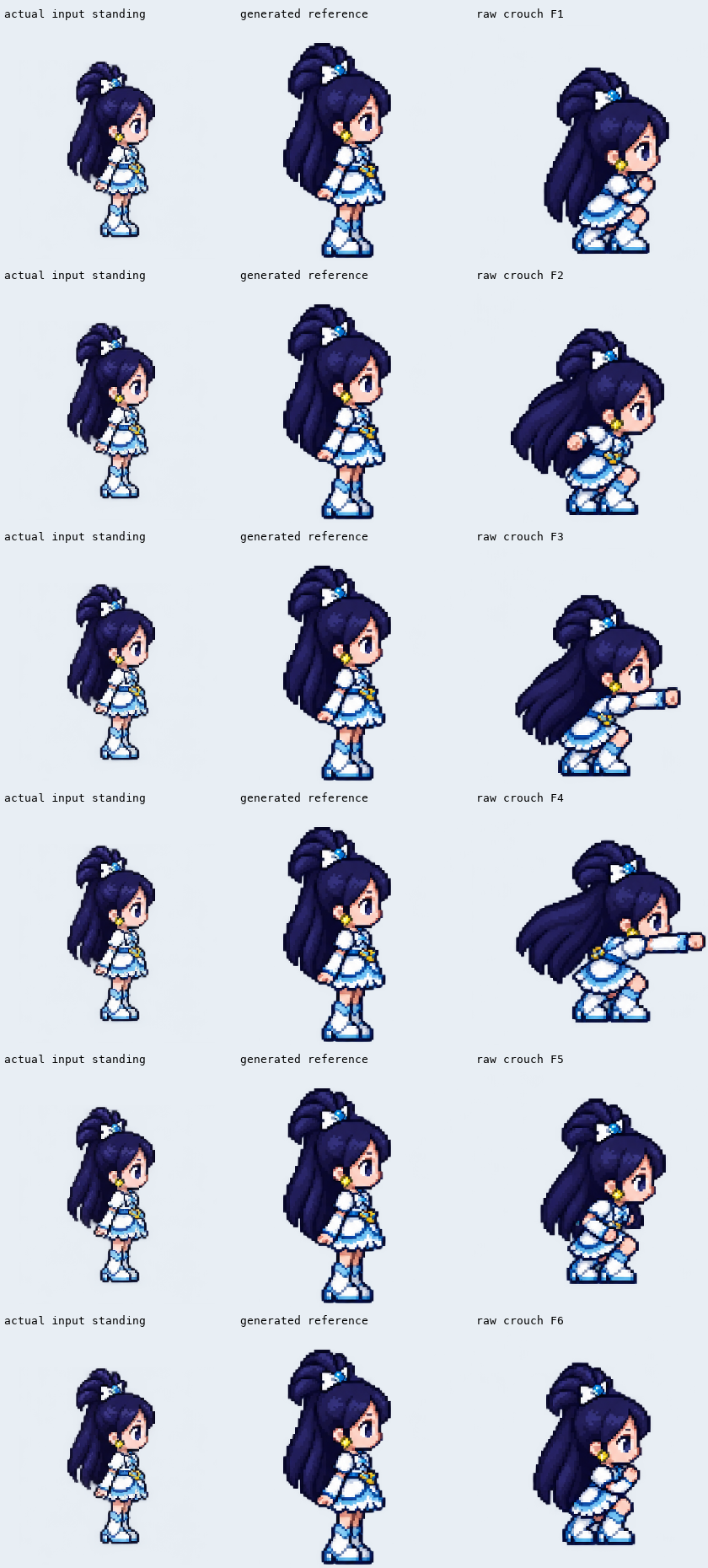
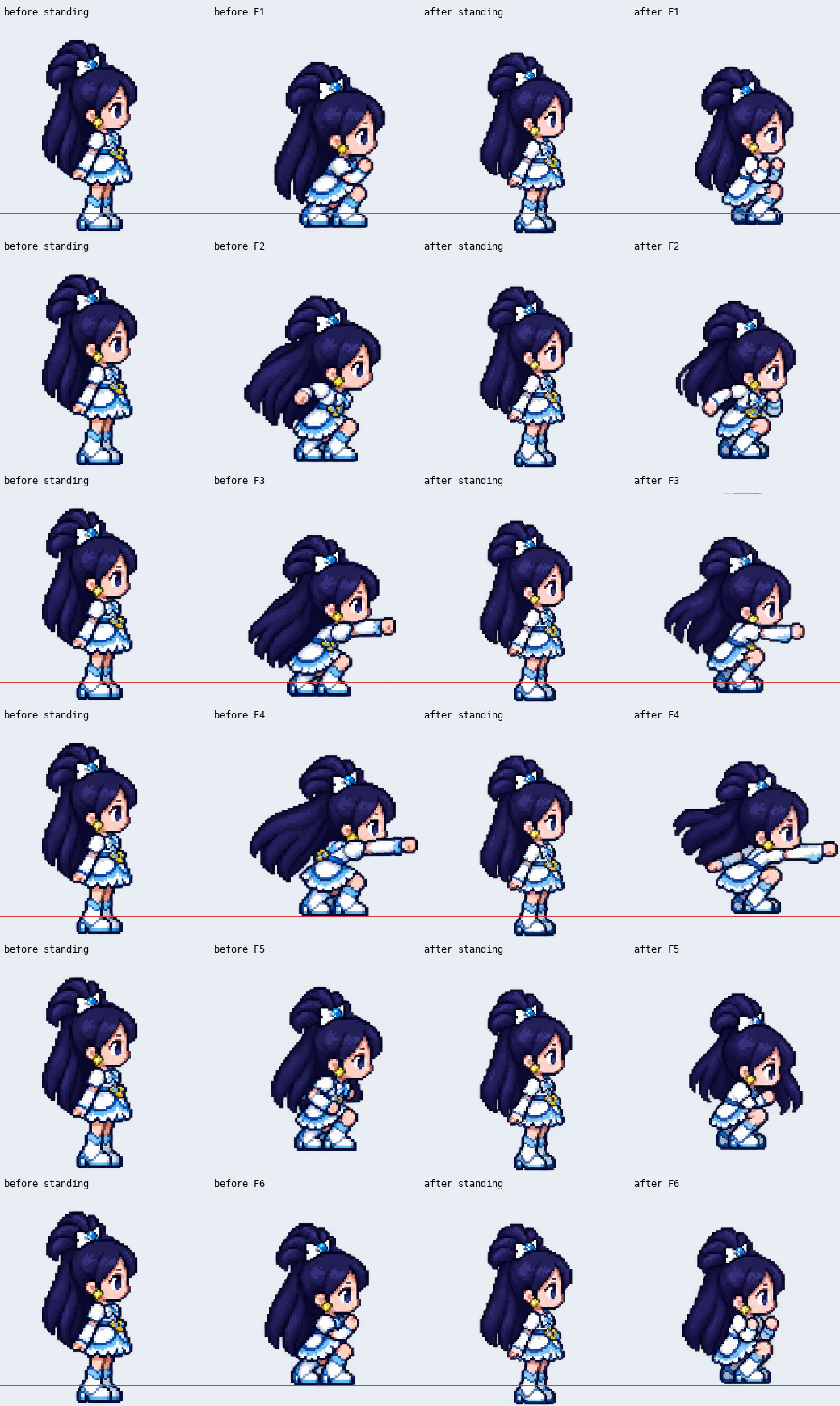
6. Failure after measuring the reference more carefully
The next experiment replaced guessed geometry with the visible alpha bounds of the input reference. It corrected how the input scale was described. The comparison shows the earlier and later generated sheets; the action planner was run again, so this is not a pixel-controlled comparison with every other variable frozen.
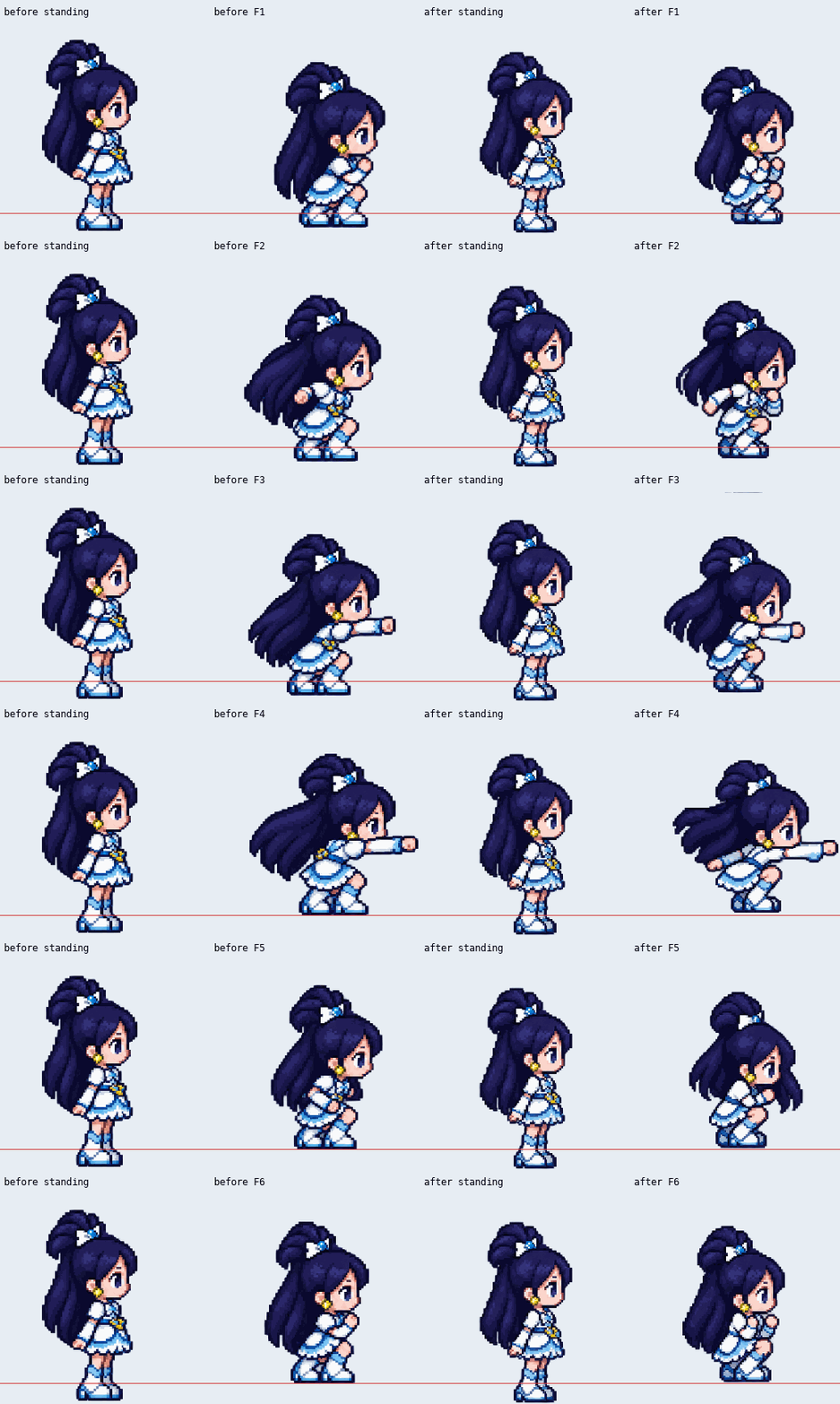
Result: the first generated standing silhouette changed from 91.15% to 85.89% of cell height, closer to the input’s measured 74.6%, but still larger. Its bottom edge reached 99.28% rather than the requested 90%. These measurements include hair and clothing; they are not bone-length measurements. Better input definitions did not make this output pass.
Inspect every before-and-after frame
7. Failure before export: the reference row crosses its boundary
For this run, the existing six-frame action plan was frozen and conflicting guide details were removed. The sheet contains three standing calibration cells above six crouching action cells. Those standing cells are reference data, not extra animation frames.
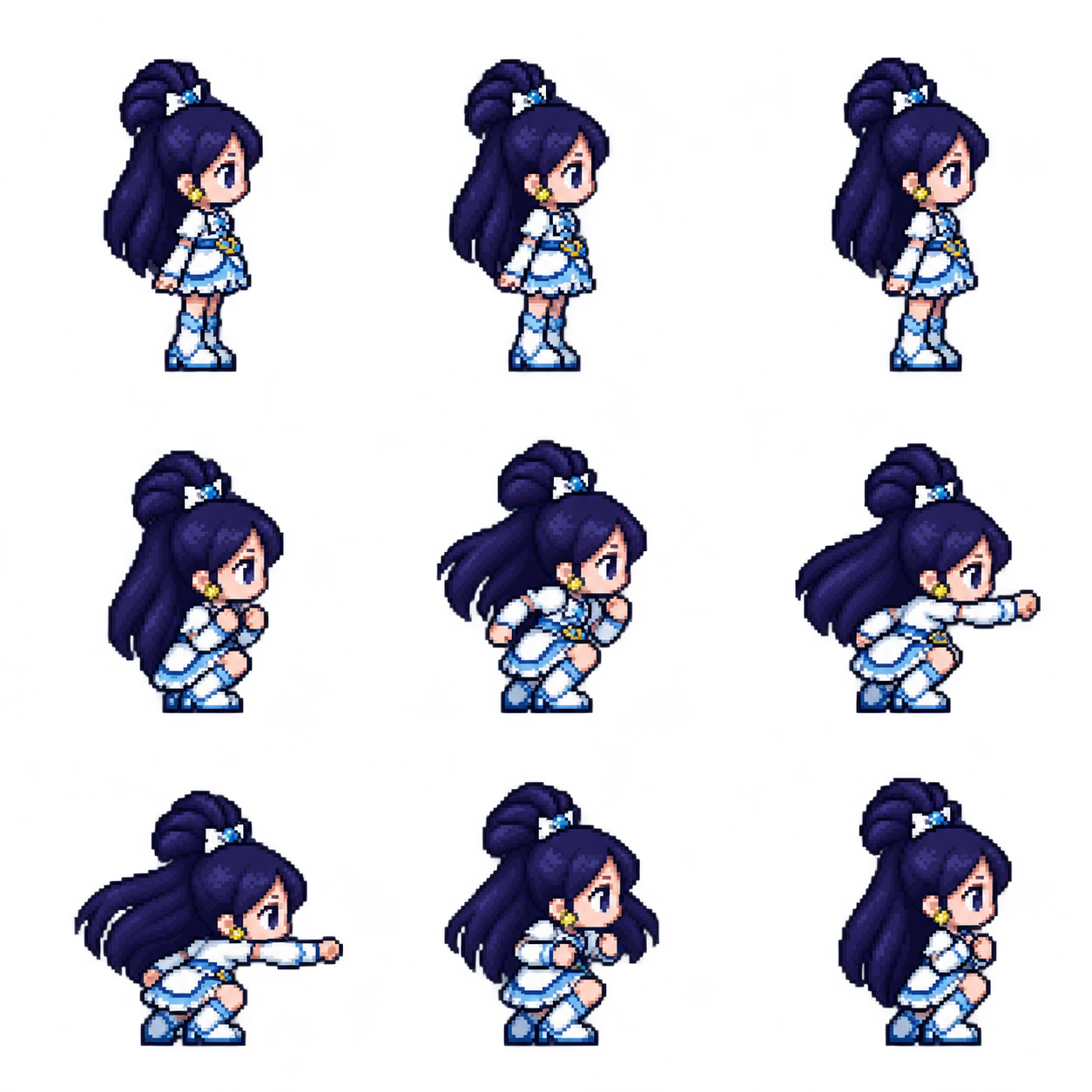
The close-up makes the failure easier to see. The red line marks the row boundary; the standing reference’s feet continue below it.
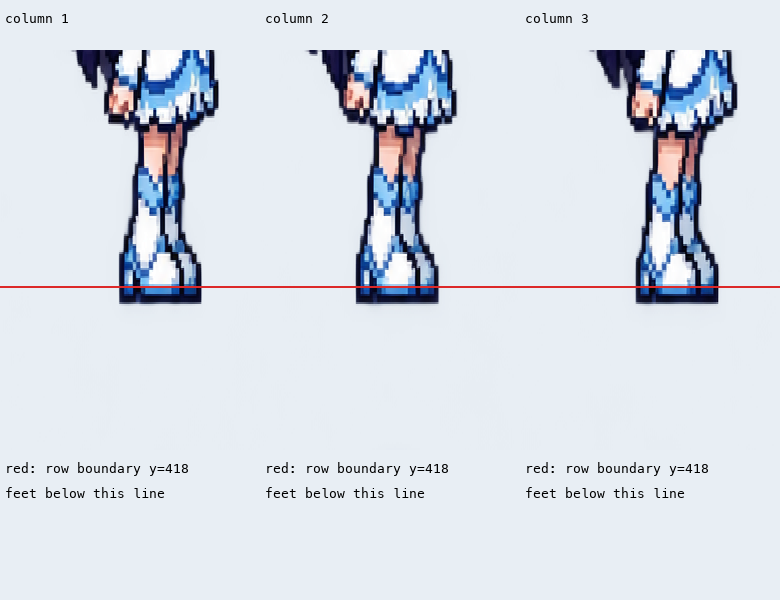
Result: the original model image already violated the sheet layout. Standing foreground crossed nine pixels into the next row, which would leave foot fragments in action cells after slicing. Production export was deliberately not run for this failed sample. The problem cannot be attributed to an exporter that had not processed it.
Compare this run with the preceding measured-reference run
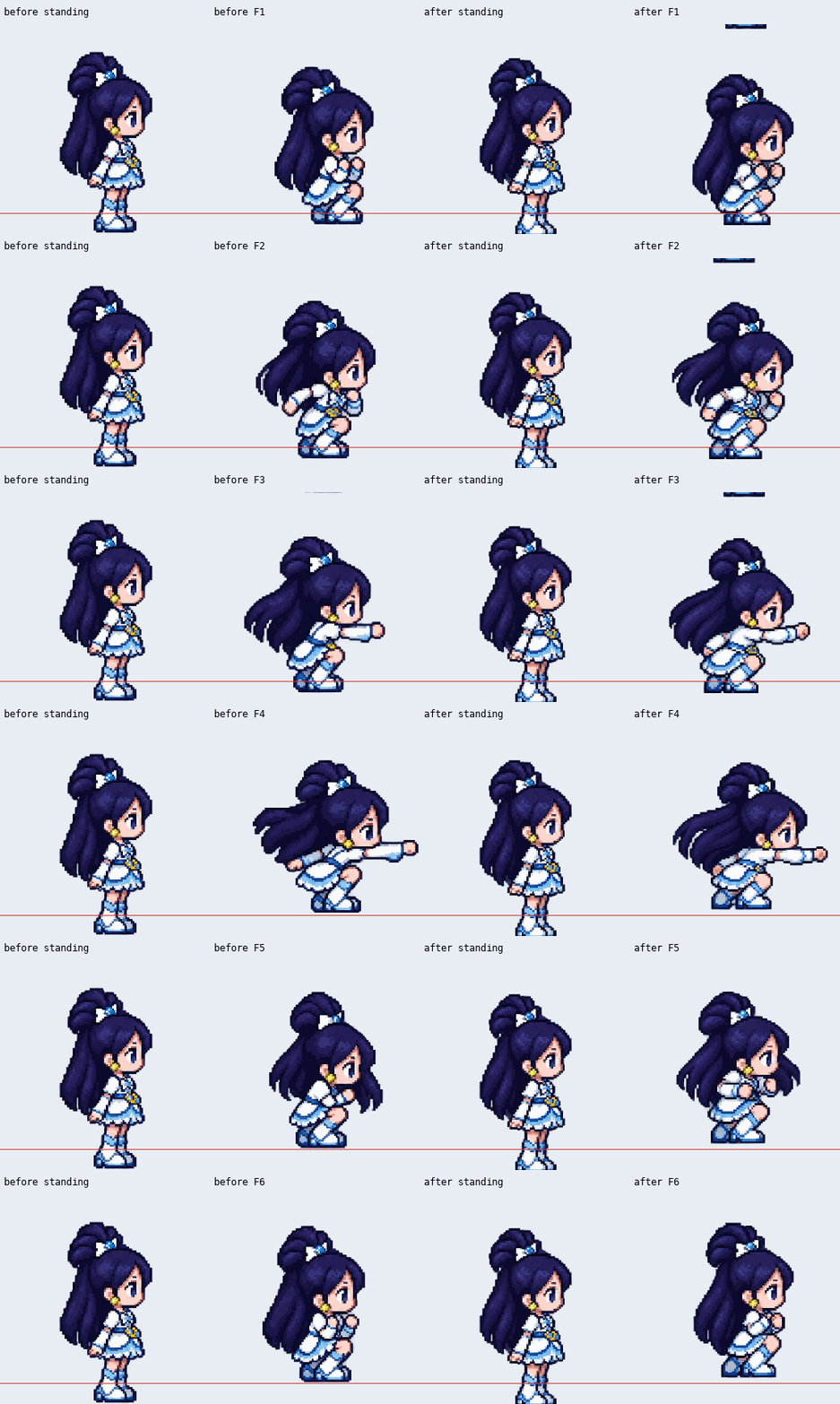
8. Success within a narrow export test: remove added magnification
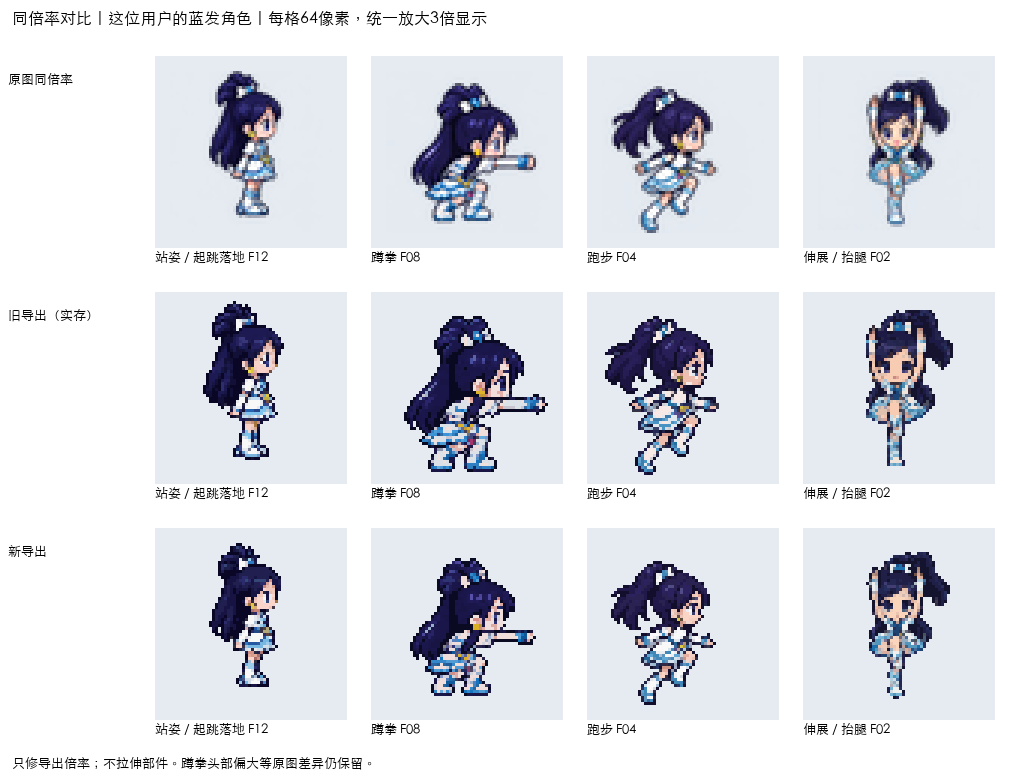
This experiment changed how existing source cells were scaled during export. It did not generate new poses or redraw body parts. In the static comparison, rows are source cells at a common scale → saved old exports → experimental new exports; columns show standing, crouching, running and stretching.
The motion preview includes five archived action groups. The long-staff character is a different character and must not be used as a same-body proportion comparison.
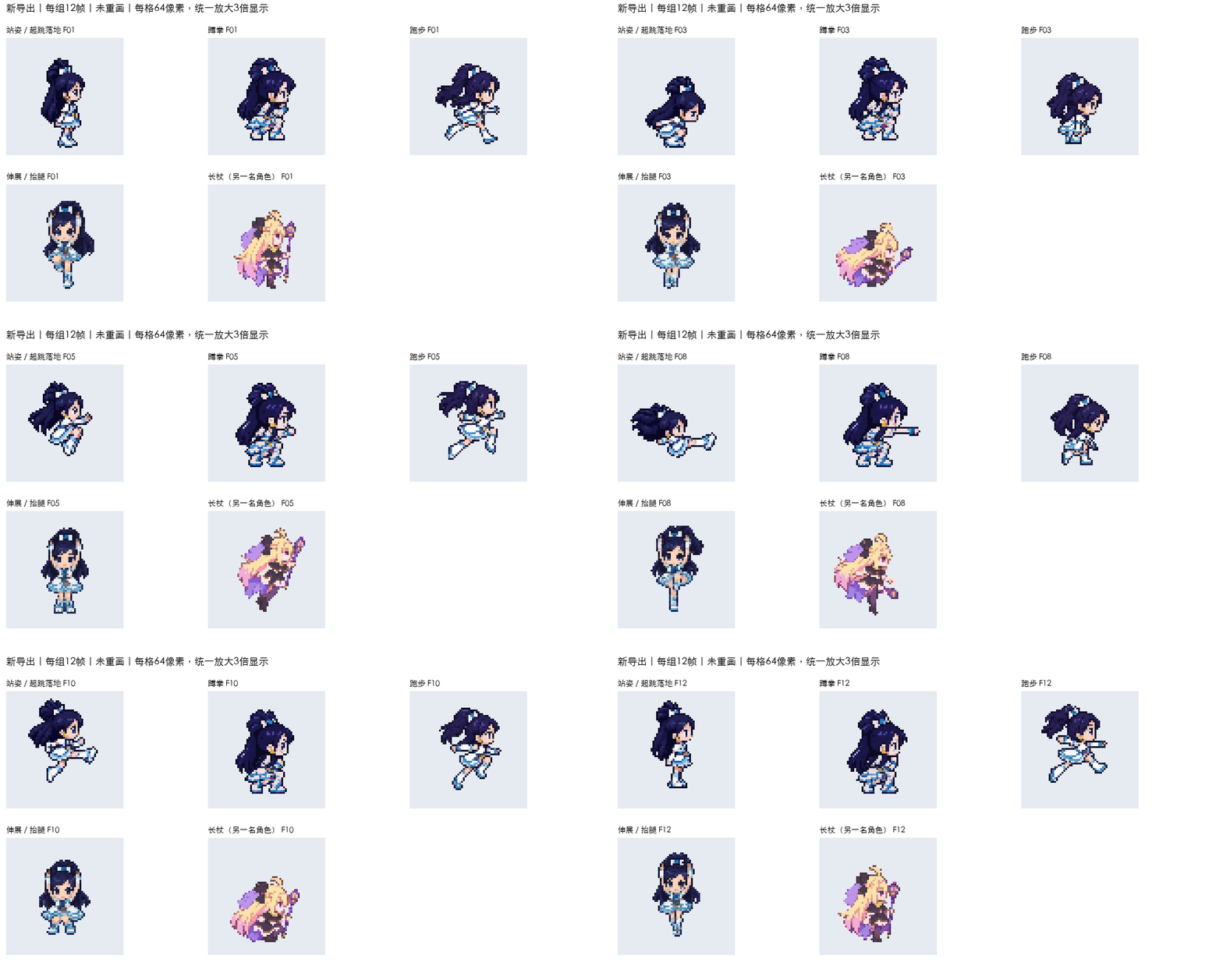
Result: in the archived test, seven groups totaling 84 frames used the intended source-cell scaling without new solid-foreground clipping. The additional crouch-versus-stand export magnification of about 4.73% was removed. Other actions’ displayed sizes also changed. This is a bounded export success, not a fix for proportions already redrawn in the source image, and the archived experiment was not deployed as a production feature.
What these experiments mean for your own workflow
Accept the movement, identity, scale, ground contact and framing separately. A convincing punch can still fail the character-design check. Fixed parts can preserve a controlled drawing while an AI-generated pose still misses the requested bend. An exporter can fix its own added scaling while leaving the model’s original body differences untouched.
None of these results establishes a generally successful automatic “change any pose without changing the design” system. The useful successes are narrower and labeled above. For a new project, test a small set of distinctly different poses before paying for a complete animation set.
5. Correct the kind of error you actually have
If the entire character is too large, check the crop and display scale first. If the head matches but the boots are shorter, changing the overall image size cannot repair that local difference. Revise the affected region with the original reference visible, or correct it in an image editor.
For a difficult bend, try a clearer pose guide. If repeated attempts still change limb lengths or garment proportions, consider a rigged cutout workflow: move and rotate existing artwork parts, then redraw the exposed joins and previously hidden areas. This requires suitable separated artwork and cleanup; it is a different production method, not a prompt setting.
A long weapon or an outstretched hand creates a framing problem too. Give the pose more canvas space before reducing the character’s size. In a series, reserve enough room for the widest pose so a single extended action does not force a different character scale.
When you need several poses or animation frames
Compare each new result with the original approved character, not only with the previous generated image. Check a few widely different poses before producing a full set: neutral, bent and extended poses expose different kinds of drift.
For animation, review playback as well as individual frames. A changing head size or slipping floor line can be much more noticeable in motion. A crouched idle-to-punch action should also remain crouched if that is the intended action; adding a standing frame changes the sequence.
For frame sizes, packing and engine import, see our sprite sheet beginner’s guide. The fighting-game sprite guide covers attack sequences in more detail.
Questions to check before keeping the result
Can I change a pose without changing the face?
Use the original image as the character reference and explicitly describe the pose change. Compare the resulting face with the original before accepting it; a reference image does not guarantee an exact match.
Why does the character look bigger when crouching?
Check whether the crouching drawing has been enlarged to fill the same image height as the standing drawing. If head and clothing details are larger too, investigate overall scale. If only some parts differ, investigate local redrawing as well.
Will a skeleton or pose guide preserve body proportions?
A guide can communicate the intended pose. Whether the generated artwork follows its lengths is a separate question that requires checking the result. Use fixed artwork parts or manual correction when your deliverable needs stricter control than the generated output provides.
Ready to animate your character?
Describe your character, get a game-ready sprite sheet in minutes. Free to start.
Try Sprite Creator →Read next
How to Make Fighting Game Sprites: Punches, Kicks and Sweeps
How to make fighting game sprites: the moves a 2D fighter needs, light vs medium vs heavy attacks, crouching and jumping moves, and one consistent fighter.